Print servers: when you still need one, and when you don't
How traditional print server architecture works, what serverless and cloud alternatives actually remove, and how to decide which model fits your environment
Last updated September 5, 2026
Key considerations
What a traditional print server actually does
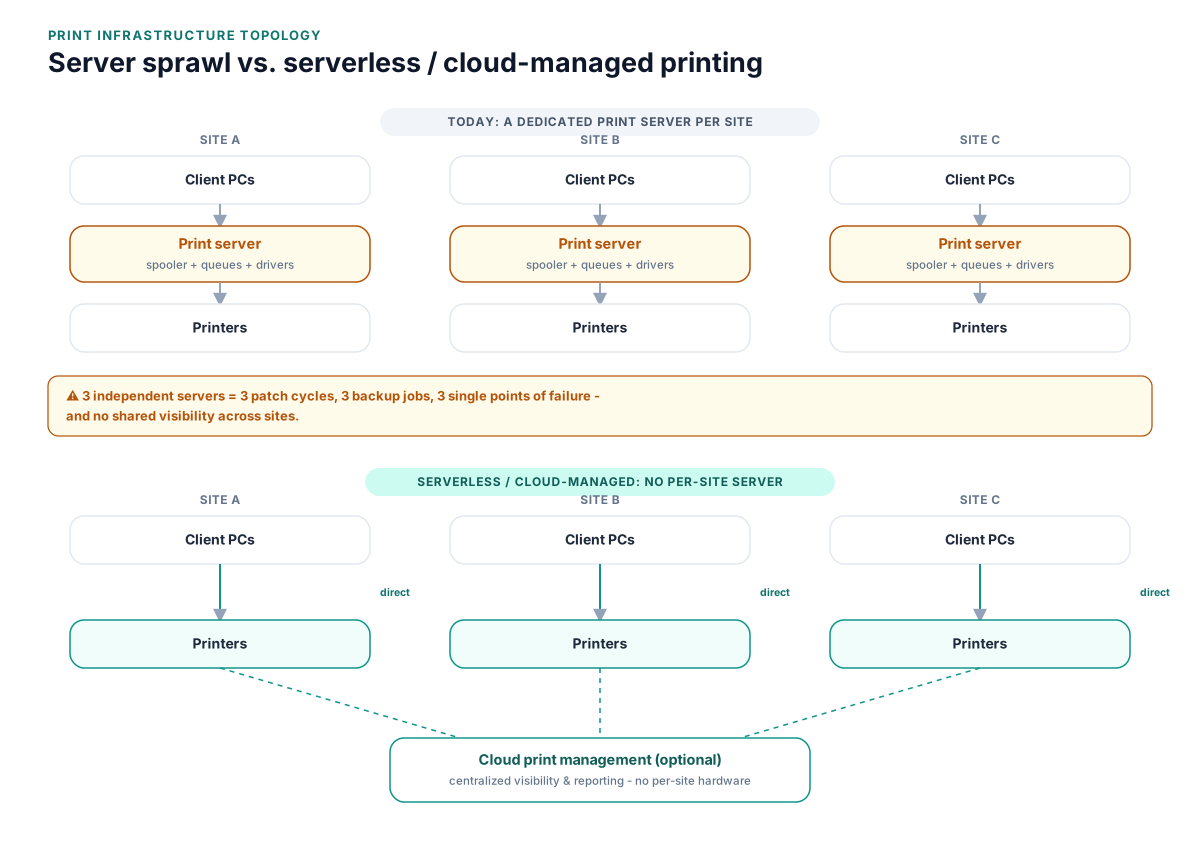
A Windows print server centralizes the spooler, print queues, and driver distribution: clients submit jobs to the server, the server manages the queue and communicates with the physical printer, and administrators deploy printer connections via Group Policy. It's a proven, well-understood model, but every function it centralizes also becomes a single dependency.
Serverless / direct-IP printing removes the middleman
In a serverless model, client devices communicate with the printer directly (or through a lightweight cloud broker) instead of routing every job through an on-prem spooler. There's no central queue-manager service to patch or keep online, but you also lose the print server's built-in centralized logging and queue-management console unless a management platform fills that gap.
Cloud print management platforms split the difference
Platforms like PrinterLogic, Printix, and PaperCut Hive replace the on-prem print server's queue-management and reporting functions with a cloud (or lightweight local) control plane, while still giving IT centralized visibility, secure release, and driver management, without the fragility of a single Windows Server instance per site.
Branch office print servers multiply the failure points, not eliminate them
A common but easy-to-miss pattern: a company that avoided a single point of failure by deploying a print server per site has instead created N points of failure, one per location, each needing its own patching, backup, and hardware refresh cycle.
The financial impact of print server sprawl
Print servers rarely appear as a distinct budget line, which is exactly why the cost of maintaining a fleet of them is easy to underestimate.
- Windows Server licensing and CALs dedicated to machines that exist only to run the spooler
- Hardware or VM hosting costs multiplied across every site running its own print server
- IT time spent patching, monitoring, and eventually migrating or retiring each server
- Downtime cost when a single print server outage takes down printing for a whole site or department
None of these costs show up on a single invoice, but they scale with the number of print servers you're operating, not with the number of printers or users those servers actually serve.
Compliance and audit considerations
A Windows print server runs the same spooler service implicated in several well-documented, actively exploited vulnerabilities, which makes its patch level a legitimate audit finding, not just an operational nuisance.
- CISA has directed federal agencies to disable the print spooler on domain controllers and systems that don't need to print, specifically because of print-spooler remote-code-execution vulnerabilities
- Security audits increasingly ask for an inventory of print servers, their patch status, and whether the spooler service is running where it doesn't need to be
- Reducing the number of print servers - and disabling the spooler service on machines that don't need it - directly reduces a documented, real-world attack surface
A short, current inventory of what print servers exist, why each one is still needed, and their patch status is usually enough to satisfy this line of audit questioning; the absence of one tends to be what draws scrutiny.
Comparing the approaches
Traditional on-prem print server(s)
One or more Windows Server instances running the Print and Document Services role, centralizing queues and driver deployment for a site or the whole company.
- Familiar model most Windows-focused IT teams already know how to run and troubleshoot
- Works well in tightly controlled, single-site LAN environments with reliable local network connectivity
- Full local control over queue behavior, logging, and driver staging
- Each server is a single point of failure for everyone who depends on it
- Ongoing patch and maintenance burden, including the print-spooler CVE history
- Remote/hybrid users depend on VPN or site-network access to reach it reliably
Serverless / direct-IP printing
Clients print directly to networked printers (or via a lightweight cloud broker), with no dedicated on-prem spooler server in the path.
- Removes the print server as a single point of failure and a patch dependency
- Scales without adding server infrastructure as sites or users grow
- Aligned with where Microsoft is taking the platform (see Universal Print, cited below)
- Loses the print server's built-in centralized queue visibility and logging unless something else provides it
- May need per-device driver or connector considerations for older, non-cloud-ready printers
Cloud/hybrid print management platform
A dedicated platform (PrinterLogic, Printix, PaperCut Hive, etc.) that replaces the traditional print server's role with a cloud or lightweight local control plane.
- Centralized visibility, secure release, and reporting without a fragile per-site Windows Server
- Scales cleanly across multiple sites and remote/hybrid users
- Typically includes migration tooling to import existing print-server queues and drivers
- Adds a platform licensing cost and a new vendor relationship to manage
- Requires upfront discovery and configuration work to map existing queues correctly
FAQ
Do I still need a print server if I move to cloud or serverless printing?
Usually not, for most day-to-day printing. A small number of niche, high-volume, or line-of-business scenarios may still benefit from a traditional server, but the vast majority of general office printing can move to a serverless or cloud-managed model.
Is serverless printing less secure than a print server?
In several documented respects it can be more secure: removing the on-prem spooler service removes a documented remote-code-execution attack surface (see the PrintNightmare-class vulnerabilities cited below). Security depends more on how the alternative is configured than on the model itself.
Can a cloud print management platform replace all of our print servers at once?
It can, but a phased migration - starting with one site or department - is the more common and lower-risk approach, since it surfaces any queue, driver, or permissions issues before a company-wide cutover.
How many print servers does a typical multi-site company actually need?
Historically, often one per site. With a serverless or cloud-managed approach, that number can usually drop to zero, or to a small number retained only for specific legacy workloads.
What happens to existing print queues and drivers when a print server is retired?
They need to be migrated (manually or with vendor migration tooling) to whatever replaces the server, whether that's direct-IP configuration on client devices or a cloud print management platform's queue import process.
Related reading
See how this applies to your situation: