Print drivers: sprawl, Protected Print Mode, and the universal driver shift
Why driver management keeps breaking, what Windows Protected Print Mode changes, and how to plan a universal/IPP driver strategy that scales
Last updated September 5, 2026
Key considerations
Windows Protected Print Mode changes the baseline
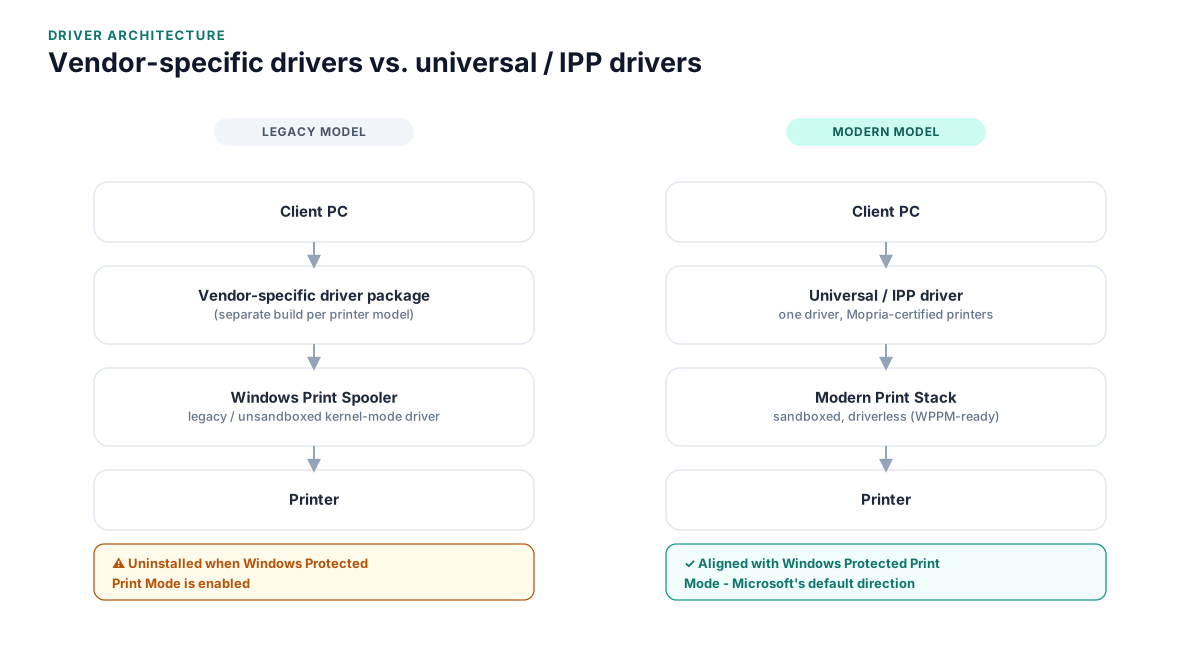
Microsoft's Windows Protected Print Mode moves PCs to the modern print stack exclusively, which works with Mopria-certified, IPP-based printers and blocks third-party kernel-mode drivers. Printers that rely on legacy drivers get uninstalled when the mode is enabled, and Microsoft has said it will eventually ship enabled by default. Fleets still relying heavily on vendor-specific drivers need a migration plan now, not after it becomes the default.
Vendor-specific drivers vs. universal/IPP drivers
Vendor drivers often expose the deepest finishing and device-specific features, but each one is a separate package to test, patch, and support. Universal and IPP-based drivers trade some device-specific functionality for a single, Windows-native driver that scales across brands and is aligned with where Microsoft is taking the platform.
Driver packages aren't "set and forget"
Driver versions need to be tracked, tested against OS updates, and patched like any other software, but they're frequently deployed once via image or GPO and then forgotten, which is exactly how sprawl and unpatched versions accumulate.
The print spooler is a real security surface
The Windows Print Spooler service has a documented history of serious vulnerabilities (the "PrintNightmare" family being the best known), which is part of why Microsoft's own security guidance now pushes toward the driverless, sandboxed modern print stack rather than continuing to trust arbitrary third-party kernel-mode driver code.
The financial impact of driver sprawl
Driver problems rarely show up as a single line-item cost, which is exactly why they're easy to underinvest in fixing.
- Recurring help desk time spent on driver conflicts, spooler crashes, and "my printer disappeared" tickets
- Delayed PC refresh and Windows upgrade projects when legacy drivers aren't validated yet
- Deployment engineering time spent packaging and testing driver updates for every printer model in the fleet
- Downtime cost when a bad driver push takes out printing for a department or site
None of these show up on an invoice the way a software license does, but they add up, and they scale with the number of distinct driver packages you're maintaining, not the number of printers.
Compliance and audit considerations
Print drivers run with elevated privileges on every endpoint that uses them, which makes them a legitimate audit and compliance concern, not just an IT nuisance.
- Security audits increasingly flag unmanaged or out-of-date print drivers as an attack-surface finding
- Regulated environments (healthcare, finance, government, education) need a documented, current driver baseline to satisfy patch-management requirements
- Windows Protected Print Mode's move toward a sandboxed, driverless model is itself a response to real-world print spooler exploits, not a theoretical concern
A documented driver strategy - what's approved, what's patched, and what's planned for migration - is usually enough to satisfy an auditor; the absence of one is what tends to generate findings.
Comparing the approaches
Vendor-specific drivers
The traditional model: install each printer manufacturer's own driver package for full feature support.
- Access to the deepest device-specific features (advanced finishing, color management, device-specific scan settings)
- Familiar to most IT teams and well-documented by manufacturers
- Heaviest ongoing maintenance burden, one package per model, each with its own patch cycle
- Most exposed to disruption as Windows Protected Print Mode becomes the default
- Scales poorly across mixed-vendor fleets
Universal / IPP drivers
A single, Windows-native driver (or a manufacturer's own universal package) that works across many models using standard IPP/Mopria support.
- Aligned with where Microsoft is taking the platform (Windows Protected Print Mode, driverless printing)
- Dramatically fewer driver packages to test, patch, and support
- Scales cleanly across mixed-vendor fleets and new device onboarding
- May not expose every advanced, device-specific finishing feature
- Older or non-Mopria-certified printers may have limited or no support
Print management platform-managed drivers
Centralizing driver deployment, versioning, and self-service installation through a dedicated print management platform rather than GPO scripts or manual imaging.
- Centralized visibility into what's actually installed, fleet-wide
- Faster, more consistent patching and rollback
- Often pairs a self-service driver portal with the ability to still push universal drivers where possible
- Adds a platform dependency and licensing cost
- Requires upfront setup and fleet discovery work to configure well
FAQ
What is Windows Protected Print Mode and how does it affect print drivers?
It's a Windows feature that restricts a PC to the modern, driverless print stack, which works with Mopria-certified, IPP-based printers. When it's enabled, printers relying on legacy third-party drivers are uninstalled, and Microsoft has indicated the mode will eventually be enabled by default, so fleets still dependent on vendor-specific drivers should have a migration plan in place.
Do universal or IPP print drivers support all printer features?
Generally they cover core print functionality reliably, but some advanced, device-specific finishing options (certain stapling/folding configurations, color profiles, etc.) may not be exposed the same way they are through a vendor's own driver. It's worth testing your specific device models before a wide rollout.
How often should print drivers actually be updated?
Treat them like any other software with security implications: patched on a regular cadence, tested against Windows updates, and reviewed whenever a manufacturer issues a security advisory, not just when something visibly breaks.
Can print drivers really be a meaningful security risk?
Yes. The Windows Print Spooler service has a documented history of serious, widely reported vulnerabilities, and third-party kernel-mode drivers are a legitimate attack surface. It's a major part of Microsoft's own rationale for moving toward Windows Protected Print Mode.
Is a dedicated print management platform necessary just to manage drivers?
Not strictly, especially for smaller fleets, where GPO-based deployment and a disciplined patching process can work fine. At scale, though, centralized visibility and self-service driver deployment tend to pay for themselves quickly in reduced help desk load.
Related reading
See how this applies to your situation: