Multi-function device management: fleet control, embedded security, and end-of-life data risk
How to manage a fleet of networked copier/printer/scanner devices, what data actually lives on an MFD's internal storage, and how to retire one safely
Last updated September 5, 2026
Key considerations
MFDs store more data than most people assume
Modern multi-function devices have internal hard drives or flash storage that cache or retain scanned, copied, and printed document images, sometimes well after the job completes. The FTC's own guidance for businesses on digital copier data security makes exactly this point, and it's worth confirming for your specific device models rather than assuming otherwise.
Manufacturer security settings vary widely, and defaults are rarely hardened
Out-of-box configurations often favor convenience - open scan-to-email or network folder access, unrestricted walk-up printing - over security. Different manufacturers expose these settings through different admin consoles, which makes a consistent security baseline harder to maintain across a mixed-vendor fleet.
End-of-life data sanitization is a documented compliance requirement, not optional housekeeping
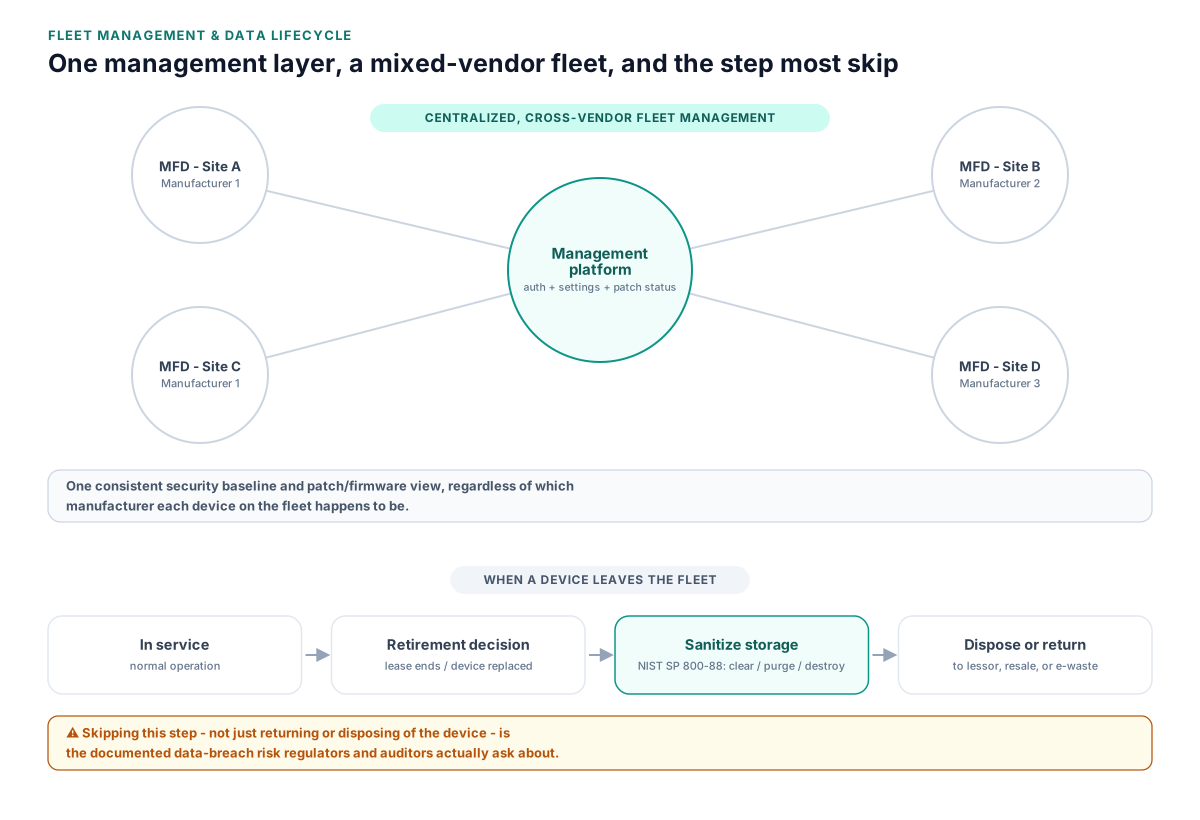
NIST SP 800-88 Rev. 2 lays out media sanitization methods - clear, purge, and destroy - appropriate to different storage types and risk levels. It applies to an MFD's internal storage the same way it applies to any other media before disposal, resale, or return to a leasing company.
Centralized management tools reduce the mixed-vendor fragmentation problem
Platforms that support embedded device apps and cross-manufacturer management give IT one place to enforce settings, track usage and cost, and require authentication at the device, instead of configuring each MFD's native console individually.
The financial impact of unmanaged MFD fleets
MFDs are typically budgeted as a lease or supplies cost, which hides the operational cost of managing them individually rather than as a fleet.
- Per-device administration time multiplied across every manufacturer's own console and firmware process
- Uncontrolled walk-up printing and copying that goes untracked against any cost-recovery or budget code
- Data-breach remediation and disclosure costs if a retired device's storage wasn't sanitized before leaving the building
- Duplicate or underused devices that a proper fleet inventory would have surfaced
As with print servers and drivers, none of this shows up as a single line item, but it scales with the number of unmanaged devices in the fleet, not with print volume.
Regulatory and audit considerations for MFD data
Because MFDs store document images on internal media, they fall under the same data-security and sanitization expectations as any other device holding sensitive information.
- The FTC has published direct guidance warning businesses that digital copiers and MFDs retain images on their hard drives, and that this needs to be accounted for in data-security practices
- NIST SP 800-88 Rev. 2 defines the sanitization standard - clear, purge, or destroy - that should be applied to MFD storage media before disposal, resale, or return to a lessor
- Security audits and compliance reviews increasingly ask specifically whether retired MFDs were sanitized, and by what method, not just whether they were returned or disposed of
A documented sanitization step built into the standard device-retirement process - not an afterthought when a lease ends - is what satisfies this line of review.
Comparing the approaches
Manufacturer-native management (per-device consoles)
Managing each MFD through its own manufacturer-provided web console and firmware update process, without a shared cross-vendor layer.
- No additional platform cost
- Familiar to teams already using the manufacturer's own tools
- Adequate for small, single-vendor fleets
- Doesn't scale across mixed-vendor fleets
- Inconsistent security settings from device to device
- No centralized reporting or cost tracking
Centralized print/device management platform
A platform (PaperCut, PrinterLogic, etc.) that layers device management, secure release, and usage tracking across MFDs regardless of manufacturer.
- One consistent security and cost-tracking baseline across the fleet
- Centralized visibility for audits and firmware/patch status
- Typically includes embedded-device authentication and secure release
- Requires licensing and initial configuration per device model
- Some advanced manufacturer-specific features may not be exposed through the platform
Manual, checklist-driven fleet governance
No dedicated platform; instead, a documented inventory, settings checklist, and retirement/sanitization procedure that IT applies and audits on a schedule.
- No new platform cost or vendor relationship
- Can be started immediately with existing tools
- Depends entirely on process discipline
- Doesn't scale well past a modest number of devices or locations
- Easy for individual devices to drift out of compliance between audits
FAQ
Do multi-function devices really store scanned documents on a hard drive?
Many do, at least temporarily and sometimes longer than expected, per the FTC's own guidance to businesses on digital copier data security. It's worth confirming for your specific device models rather than assuming otherwise.
What's the right way to wipe an MFD's storage before it's returned or resold?
Follow a recognized standard like NIST SP 800-88 Rev. 2, which defines clear, purge, and destroy methods appropriate to different media types and risk levels, rather than relying on a factory-reset option alone.
Can one platform manage MFDs from different manufacturers consistently?
Yes - centralized print/device management platforms are built specifically to apply consistent settings, authentication, and reporting across mixed-vendor fleets, which a manufacturer's own console can't do for other brands' devices.
Who is typically responsible for sanitizing an MFD's storage when a lease ends?
It depends on the lease terms, but the responsibility often defaults to the organization unless the contract explicitly assigns it to the leasing company or manufacturer, so it's worth confirming in writing rather than assuming.
How often should MFD security settings and firmware be reviewed?
On a regular, scheduled cadence, similar to any other networked device, rather than only at installation. Firmware vulnerabilities and default-setting drift both accumulate over time.
Related reading
See how this applies to your situation: