Cloud print management: what actually moves to the cloud, and what doesn't
How cloud print platforms and Microsoft Universal Print work, what still runs locally, and how HIPAA and other compliance requirements factor into the decision
Last updated September 5, 2026
Key considerations
What Microsoft Universal Print actually is
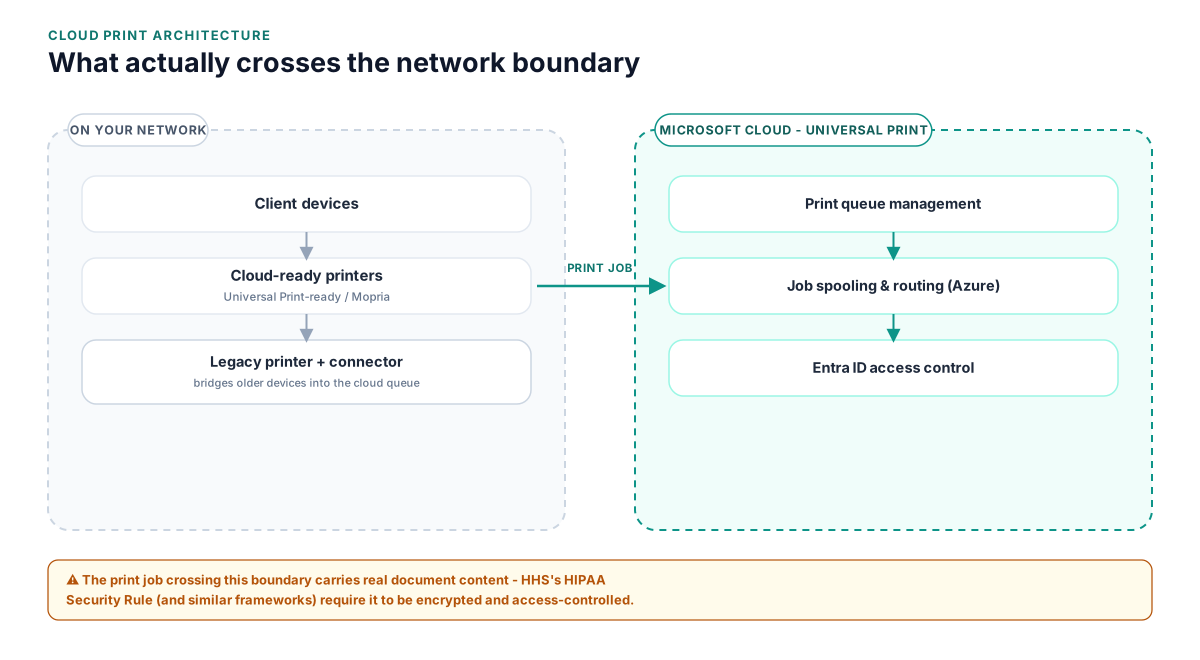
Universal Print is a cloud-based print management service built into Microsoft 365, hosting print queues in Azure instead of on an on-prem print server. It works natively with Universal Print-ready printers and supports older devices through connector software, but it's worth understanding that distinction before assuming every printer in a fleet is immediately cloud-ready.
"Cloud print" doesn't always mean zero local footprint
Many platforms marketed as cloud print still run a small local connector or client on a machine on the network to bridge legacy printers into the cloud service. That's a reasonable, common design, but it's a different architecture than a fully cloud-native service, and the difference matters for patching, uptime dependencies, and what actually happens if that local connector goes offline.
Print jobs carry real document content, which is why compliance frameworks care
A print job sent through a cloud service is document content in transit and, often, briefly at rest, which means it can carry protected health information, financial data, or other regulated data. HHS's HIPAA Security Rule sets the baseline safeguards - administrative, physical, and technical - that apply whenever a service handles electronic PHI, cloud print included.
Legacy printers are the long tail of most cloud print migrations
Non-cloud-ready devices typically need a connector, a firmware update if the manufacturer offers one, or eventual replacement. Mapping this list of devices before rollout - rather than discovering it site by site - is usually what separates a clean migration from a stalled one.
The financial impact of an unplanned or stalled cloud print migration
Cloud print is usually pitched on infrastructure savings, but a rollout that stalls partway through can temporarily cost more than the print servers it was meant to replace.
- Running duplicate infrastructure - legacy print servers kept alive alongside a partially completed cloud rollout
- IT time spent troubleshooting a patchwork of cloud and legacy print paths instead of one consistent model
- Platform licensing committed before the legacy device gap was fully scoped
- Delayed retirement of the on-prem servers the migration was supposed to eliminate
None of this shows up as a single line item, but it scales with how long a partial migration lingers, not with the size of the fleet itself.
HIPAA and other regulatory considerations for cloud print
Print jobs sent through a cloud print service carry document content and metadata off the local network, which brings the HIPAA Security Rule (and analogous regulations elsewhere) into scope for organizations handling protected data.
- HHS's Security Rule requires administrative, physical, and technical safeguards for electronic PHI; a cloud print vendor handling PHI-containing jobs should be willing to sign a Business Associate Agreement and document its safeguards
- Encryption in transit and at rest, retention/deletion policies for print job data, and access controls are the specific items worth verifying in writing with any cloud print vendor before rollout
- Non-healthcare regulated environments (finance, legal, student records) face analogous data-handling questions even where HIPAA specifically doesn't apply
A short data-handling questionnaire answered by the vendor in writing - not marketing claims alone - is usually what a compliance review actually needs to see.
Comparing the approaches
Microsoft Universal Print (fully cloud-native)
Microsoft's cloud print service, built into Microsoft 365 and Entra ID, hosting print queues entirely in the cloud with no on-prem print server in the path.
- Native integration with Entra ID and Microsoft 365, often within an existing subscription
- No on-prem print server to patch, maintain, or keep online
- Licensing frequently ties into infrastructure a Microsoft 365 tenant already has
- Requires Universal Print-ready printers, or connector software for older devices
- Narrower feature set than some dedicated print management platforms (e.g., advanced cost tracking or reporting)
Third-party cloud/hybrid print management platform
Platforms such as Printix, PaperCut Hive, or PrinterLogic SaaS that provide a cloud control plane with varying degrees of local connector use.
- Typically broader reporting, cost tracking, and secure-release features than Universal Print alone
- Migration tooling to import existing print server queues and drivers
- Vendor-managed platform updates
- A separate licensing relationship outside Microsoft's ecosystem
- The degree of "cloud" varies by vendor and should be confirmed directly, not assumed from marketing language
Hybrid: cloud print for the standard fleet, print server retained for niche workloads
Migrating the majority of general office printing to a cloud platform while keeping a small, scoped print server for specific high-volume or legacy line-of-business printing.
- Lets most of the fleet realize cloud benefits without forcing every edge-case workload onto a platform that doesn't fit it yet
- Lower-risk, incremental migration path
- Still carries some maintenance burden for at least one retained print server
- Requires clear, written documentation of which workloads stay behind and why, so the exception doesn't quietly become permanent
FAQ
Does Microsoft Universal Print eliminate the need for a print server entirely?
For most standard office printing, yes, provided printers are Universal Print-ready or connected through Microsoft's connector software for older devices. Niche or high-volume line-of-business printing may still need case-by-case evaluation.
Is cloud print HIPAA compliant?
It can be, but compliance depends on the specific vendor's safeguards, encryption, and willingness to sign a Business Associate Agreement, not on the fact that a service is labeled "cloud." HHS's Security Rule sets the baseline requirements to verify against.
Do all cloud print platforms eliminate local infrastructure completely?
No. Some run entirely in the cloud with no local component; others use a local connector or lightweight client to bridge on-prem printers, especially older, non-cloud-ready devices. It's worth confirming exactly what runs where for any specific platform.
What happens to older printers that aren't cloud-ready?
They typically need a connector application, a firmware update if the manufacturer offers one, or eventual replacement. Mapping this list of devices before rollout prevents it from becoming a late-stage surprise.
How does cloud print pricing typically compare to running an on-prem print server?
Cloud print usually shifts cost from server hardware, licensing, and patching effort to a per-user or per-printer subscription fee. Whether that's cheaper depends on fleet size and how much on-prem infrastructure it's actually replacing.
Related reading
Sources
See how this applies to your situation: